All of Android on the Tesla screen. It switches on by itself when you get in.
The apps on your phone open right on the car's big screen: navigation, YouTube, music, messengers. All you need is an Android phone — no cables, no extra devices. Get in and unlock the phone, and ATTD starts by itself. Get out, and it switches off.
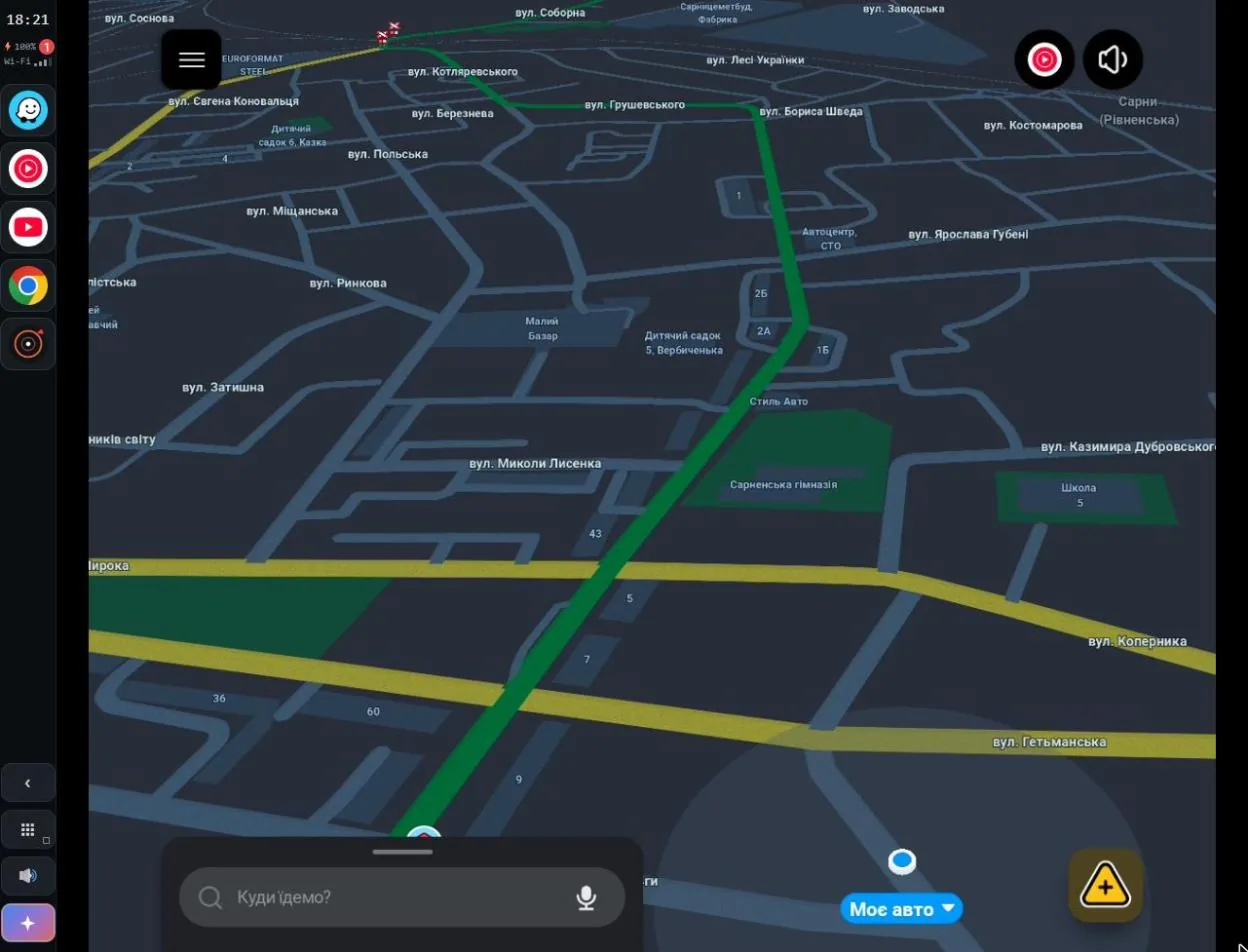
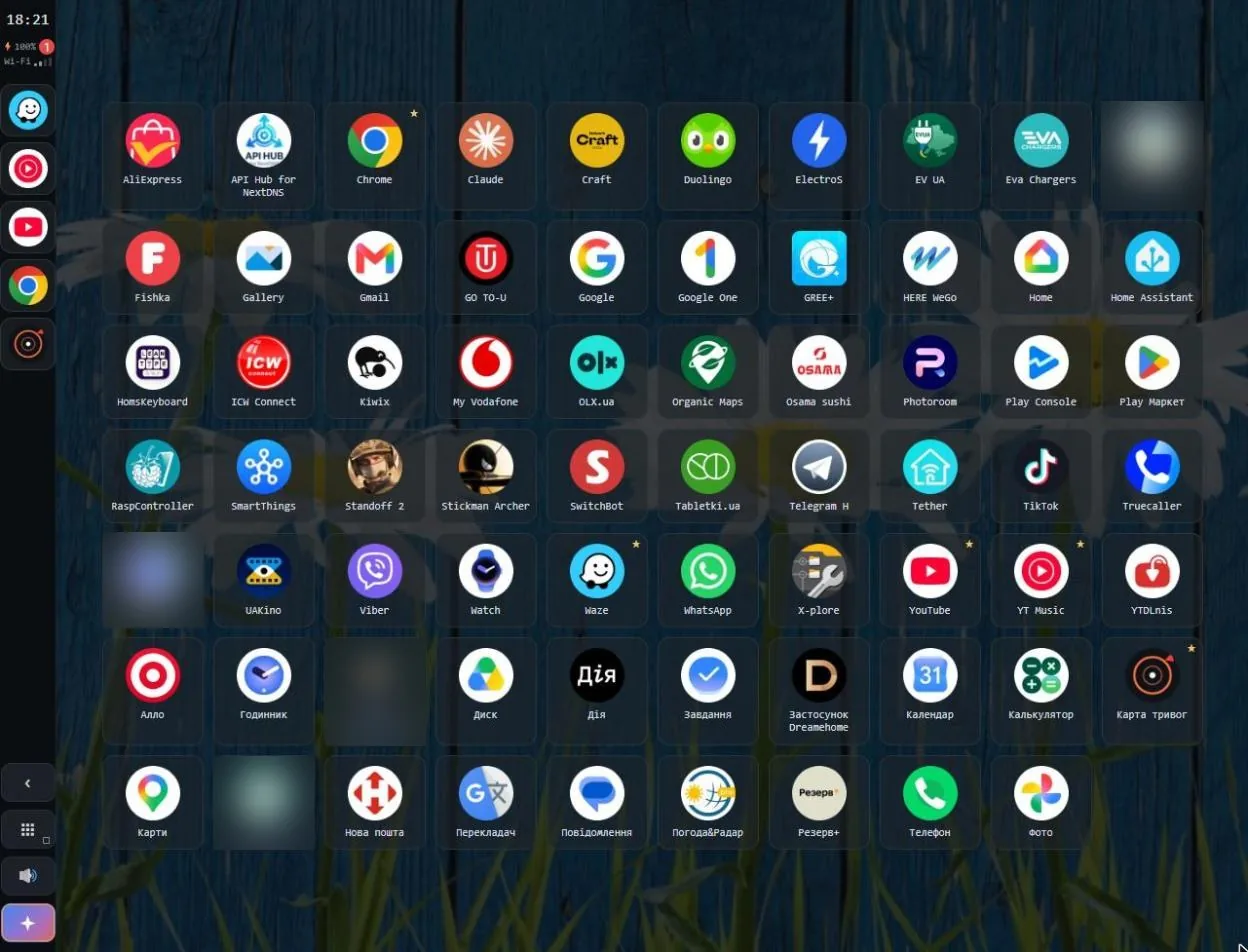
This is what it looks like in the Tesla browser
Real ATTD 6.95 frames, October 2026. The phone is locked at the time. Personal apps are blurred.
From getting in to getting out, without touching the phone
You pick the car for auto-start once in the settings. After that, every trip goes like this:
- 0 s
Bluetooth connects
The phone sees your Tesla and ATTD brings itself to the front.
- unlock
One glance, and it starts
Unlock with your face or fingerprint any time within 15 min and ATTD starts by itself. Already unlocked? It starts right away.
- Wi‑Fi
Hotspot and your app
The phone turns on its hotspot, the car joins, and your chosen app, say Waze, is already open on the car screen.
- locked
You can lock it
If the screen goes off, the phone turns it back on and dims it. Touch and picture keep working in the car.
- on the road
Everything at hand
Audio without Bluetooth, “hey tesla”, notifications on the car screen, navigation that survives GPS jamming.
- +30 s
You leave, everything stops
Bluetooth drops: 30 seconds later ATTD ends the stream and the hotspot.
No need to keep the phone unlocked or put it in a holder
Other approaches either mirror the phone screen, which means the lock screen, or stick to Android Auto. ATTD shows a separate display and keeps it alive while the phone is locked.
- Touch and picture work in the car while the phone is locked.
- The screen is dimmed so it doesn't glow or heat up. If you prefer to see your own lock screen, there's a “Dim the locked screen” switch.
- Pressed the power button mid-trip? The phone turns the screen back on by itself and the stream stays. With the “Power button reveals the screen” switch, it shows your normal lock screen instead.
- Apps open without animations, so the picture on the car screen stays smooth.
For “hey tesla”, keep the phone in a holder: the voice assistant listens through the phone's microphone and may not hear you from a pocket.
Tuned for the most popular phone brands
Every Android firmware behaves its own way: gestures, audio, the keyboard, the Wi‑Fi hotspot or background launches can all differ. We collected logs from real trips and tuned ATTD for each of them.
Each adaptation switches on only for its own brand, so a fix for one phone changes nothing on the others. Found a quirk on your model? The diagnostic log is collected right in ATTD.
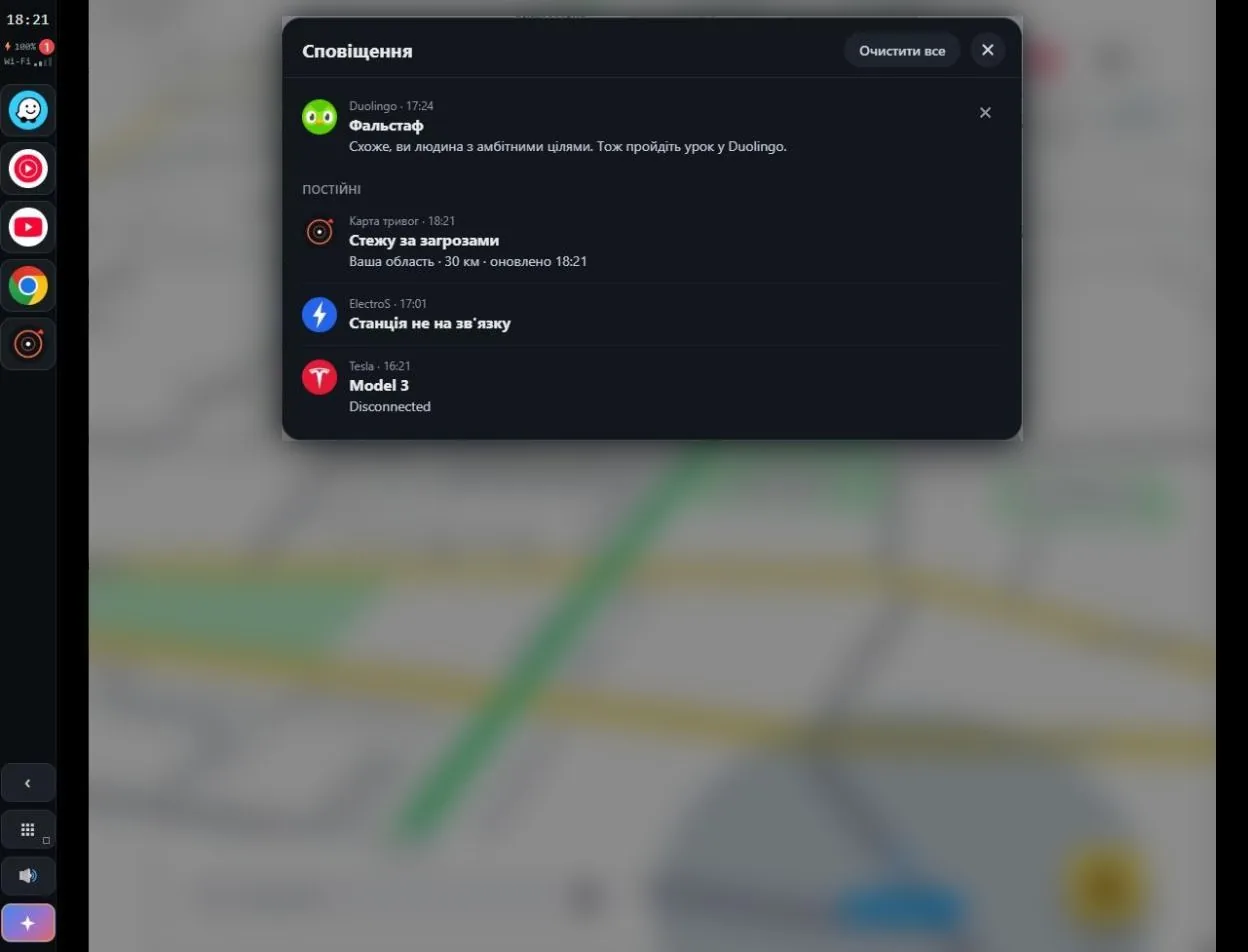
The phone's notifications where you actually look
- Tap the network icon at the top to open the notification panel; a red counter shows how many are new.
- Pop-up banners: off, important only, or all.
- Tap a notification and the app opens right on the car screen.
- “Mute notification sounds”: while streaming, notifications stay silent and don't interrupt the music.
What else ATTD does
Everything below is a separate switch or setting in the app. The defaults are chosen so most people never need to touch them.
Picture
- Scale, frame rate and bitrate for your car: bigger elements or more on screen, smoothness versus heat.
- Video in sync with audio: the picture is held back to match the sound and catches up the moment you touch, so controls never lag.
- “Don't rotate the car display” for apps that insist on portrait.
- The Android status bar on the car screen, if you want it.
Audio
- Lossless PCM, or Opus for weak Wi‑Fi.
- Audio on its own thread: it doesn't break up when the Tesla browser stalls on drawing.
- “Keep media playing”: music keeps going when you open the navigator.
- “Mute notification sounds” for the trip; afterwards everything is back as it was.
Assistant
- Gemini by Google on the ✦ button, no API key. As a fallback, a built-in assistant on Gemini or Grok by x.ai.
- “Hey tesla”: the wake-word model runs on the phone itself, no audio goes online. Sensitivity tuned to your voice.
- The car's microphone on AMD Ryzen Teslas, the phone's microphone on Intel ones.
- Default navigator: voice routes go to Waze, Google Maps, HERE or Organic Maps.
Controls on the car screen
- A control strip with the clock, phone status and favourites, can sit on the left, closer to the driver.
- App menu: you pick which tiles to show and how big they are.
- App on connect: opens by itself after the start.
- Music panel, A/B odometer and stream stats on top of any app.
For Ukrainian roads
- GPS-jamming protection: position from the Tesla, and from towers and Wi‑Fi when jammed.
- The air-alert map installs from ATTD with one tap.
- “Keep after Stop”: Dron Alerts, the alert map and messengers keep running after the trip.
Upkeep
- Shizuku is no longer needed: ATTD gets its permissions by itself over wireless debugging.
- A setup checklist with ✅ and ❌: you see what's missing, and a button takes you there.
- Self-update with a download progress bar.
- Diagnostics and “State on screen”: a log for the developers and a quick look at what's going on.
ATTD and six other ways to put a phone on a Tesla
At the top: what only ATTD offers among solutions with no extra hardware — full Android while locked, automation and per-brand tuning.
| ATTDAndroid Tesla Trusted Display | PlayslaUAB EUSPRO, Vilnius · beta | TaaDaDiagonApps, Paris | TeslAAandroidwheels.com | Castlaopen source | USB boxesCarlinkit, Ottocast | Tesla AndroidRaspberry Pi + LTE | |
|---|---|---|---|---|---|---|---|
| Hands-free: getting in to getting out | |||||||
| Full Android while the phone is lockedtouch and picture on a locked phone | wakes and dims the screen itself | Android Auto only | Android Auto only | Android Auto only | mirrors the phone screen | Android Auto / CarPlay | phone not involved |
| Auto-start when you get in | from your Tesla's Bluetooth | box powers up from USB | Pi powered by the car | ||||
| Auto-stop when you leaveends the stream and the hotspot | 30 s after Bluetooth, or on a timer | powers off with the car | powers off with the car | ||||
| Tuned for popular phone brandsfrom real-trip logs | per brand, no effect on others | ||||||
| Phone notifications on the car screenpanel, banners, open the app | from any app | within Android Auto | within Android Auto | within Android Auto | within Android Auto | ||
| What the driver sees | |||||||
| Any appYouTube, browser, banking, games | separate display, phone stays free | Android Auto only | Android Auto only | Android Auto only | mirror of the phone screen | Android Auto / CarPlay | Android on the Pi |
| Android keyboard on the car screen | full, like a tablet | dictation only | dictation only | dictation only | |||
| Audio through the browser, no Bluetooth | lossless, 48 kHz | via Bluetooth | via Bluetooth | AAC, “experimental” | via Bluetooth | lossless | |
| Smooth video | up to 60 fps, hardware H.265 | up to 1080p, fps not stated | reviews mention lag | still frames, ≈ 1 s lag | 60 fps (claimed) | MJPEG, 5–12 fps | 30 fps |
| “Hey tesla” — Gemini Live on the car screenroute, call, music, YouTube | hands-free, no API key | Android Auto assistant | Android Auto assistant | Android Auto assistant | Android Auto / Siri | Google Assistant | |
| Video by voice, straight to full screenfind, play, expand | Gemini finds it, ATTD expands it | no YouTube in Android Auto | no YouTube in Android Auto | no YouTube in Android Auto | |||
| Navigation keeps working under GPS jammingposition from the Tesla; when GPS is jammed or spoofed, from cell towers and Wi‑Fi, with no jumps | Waze, Google Maps and others keep guiding | ||||||
| Doesn’t depend on Android AutoGoogle updates can’t break it | needs Android Auto | needs Android Auto | needs Android Auto | ||||
| Terms | |||||||
| What you need | Android 13+, one pairing at home | Android 8+ and Android Auto | Android 8+ | Android and Android Auto | Android 8+, Shizuku | a box in the car’s USB | Raspberry Pi, LTE modem, fitting |
| Price | per-phone licence, free trial | €2.45/mo, 3-day trial | €1.99/mo or €59.99 lifetime | $6.50 one-off | free | from ~$90 | your own hardware |
| Greens out of 13 | 13 | 0 | 0 | 0 | 2 | 2 | 6 |
Scenarios nobody else has
Say “hey tesla” or tap ✦ — Gemini Live by Google opens on the car screen, no API key, no touching the phone. Say “hey tesla” again to end the conversation.
The phone connects to the car and ATTD is already on screen. Glance and unlock, and everything starts: the hotspot, the car screen and your chosen app, say Waze. Then you can lock the phone.
Gemini finds the video on YouTube and ATTD expands it to full screen, no taps needed.
The route opens straight in your navigator: Waze, Google Maps, HERE or Organic Maps. Even when Gemini wants Google Maps, ATTD hands the route to your Waze, and Maps never flashes on screen.
The music plays in the car through YouTube Music connected to Gemini. The conversation ends by itself.
The call goes from the phone; music pauses and comes back after the call.
A red counter by the network icon; one tap opens the panel, another opens the app on the car screen. With “Mute notification sounds” on, the chime doesn't interrupt the music.
The navigator keeps guiding, and the car screen shows the state, e.g. “jamming · no GPS 4 min · ±300 m”. Once GPS is clean, everything switches back.
A music panel ⏮ ⏯ ⏭ and a trip odometer with distance, driving time and average speed. A/B counters, like in the car.
30 seconds after Bluetooth drops, everything stops by itself: the stream, the hotspot, the dimming. The phone doesn't drain in your pocket.
Getting started
All of this is done once. After that ATTD runs by itself.
Install ATTD
A regular APK. After that the app updates itself.
Pair once at home
Turn on wireless debugging and type the six digits right in the notification shade. Buttons in ATTD take you there. No Shizuku needed.
First trip: tap Start
The phone turns on its hotspot by itself. Open your address in the Tesla browser and bookmark it.
Pick the car for auto-start
Once, in the settings. ATTD checks your firmware's permissions and tells you if anything is missing.
Limits
After a reboot, a minute of Wi‑Fi
After a reboot or an update the phone has to see any Wi‑Fi once. Then ATTD keeps working until the next reboot.
Android 13 and newer
Playsla and TaaDa install from Android 8.
Netflix and other DRM video
Black screen with sound. No browser-based solution can show protected video.
Intel Teslas (before 2022)
The browser is weaker: keep the picture smaller, audio may break up.
Hotspot must be WPA2
The car can’t see a WPA3-only network. ATTD warns you about it.
Where the data comes fromATTD — version 6.95, October 2026
- ATTD: measurements in a 2024 Model 3 Highland (AMD Ryzen), logs from Xiaomi, Redmi, Samsung and Nothing phones, and the project code.
- “Not stated” means we found no such feature in the competitor's descriptions and documentation.
- playsla.top, Playsla (Google Play listing) — Android Auto in the Tesla browser, requires Android Auto, Android 8+, 480/720/1080p, €2.45/mo, 3-day trial, v0.2.6 of 3 Sep 2026. Checked 9 Oct 2026.
- taada.top, TaaDa doc.md, grand-screen.com — prices, Android 8+, audio via Bluetooth, reviews about lag.
- XDA, Electrek — TeslAA: $6.50, still frames and ≈ 1 s lag after the Tesla browser update.
- Castla — H.264, 60 fps, experimental AAC, Shizuku.
- TMC, Car Tech Studio — Carlinkit and Ottocast boxes, from ~$90; 5–12 fps is our own measurement.
- Tesla Android Project — 30 fps, lossless audio, Raspberry Pi.
Questions about installation, the trial and the licence, bug reports: the ATTD Telegram group. The developers answer.
Join the group